 HMT
HMT 
724 字
4 分钟
pytorch学习05:索引和切片
索引
import torch
a = torch.rand(4,3,28, 28)print("a.shape: ", a.shape)print("a[0].shape: ", a[0].shape)print("a[0][0].shape: ", a[0][0].shape)print("a[0, 0].shape: ", a[0, 0].shape)print("a[0, 1, 2, 3]: ", a[0, 1, 2, 3])![[外链图片转存失败,源站可能有防盗链机制,建议将图片保存下来直接上传(img-5qVSuPal-1627480281333)(https://s3-us-west-2.amazonaws.com/secure.notion-static.com/83ac1070-9ccd-4c91-833a-5fffc844ad9a/Untitled.png)]](/images/csdn/75c06e327c978beb216a5bc9.png)
取前N个或后N个
import torch
a = torch.rand(4,3,28, 28)print("a.shape: ", a.shape)# 取第一维[0, 2)print("a[:2].shape: ", a[:2].shape)# 取第一维的 [0, 2) ,第二维的 [0, 1),第三维的全部,第四维的全部print("a[:2, :1, :, :].shape: ", a[:2, :1, :, :].shape)# 取第一维的 [0, 2) ,第二维 [1, 最后一个] ,第三维的全部,第四维的全部print("a[:2, 1:, :, :].shape: ", a[:2, 1:, :, :].shape)# 取第一维的 [0, 2) ,第二维 [倒数第1个, 最后一个] ,第三维的全部,第四维的全部print("a[:2, -1:, :, :].shape: ", a[:2, -1:, :, :].shape)![[外链图片转存失败,源站可能有防盗链机制,建议将图片保存下来直接上传(img-EH7wyzSD-1627480281336)(https://s3-us-west-2.amazonaws.com/secure.notion-static.com/efd33910-2895-4653-99d4-e59e6d6d82cf/Untitled.png)]](/images/csdn/3935979f838f3a1eda0a0817.png)
按步长选择
import torch
a = torch.rand(4,3,28, 28)# 第三维取[0, 20),步长为2, 第四维取[0, 20),步长为2print("a[:, :, 0:20:2, 0:20:2].shape: ", a[:, :, 0:20:2, 0:20:2].shape)# 对第三维和第四维所有数据按步长为2进行抽取print("a[:, :, ::2, ::2].shape: ", a[:, :, ::2, ::2].shape)
b = torch.arange(0, 10)print("b[::2]", b[::2])![[外链图片转存失败,源站可能有防盗链机制,建议将图片保存下来直接上传(img-wOYRlHpp-1627480281338)(https://s3-us-west-2.amazonaws.com/secure.notion-static.com/f3a6ba73-f9fe-4ac6-981f-cd709d82b016/Untitled.png)]](/images/csdn/c9399ff1fa38e6d95a08658d.png)
自定义选取
import torch
a = torch.rand(4,3,28, 28)
# 第一个变量代表维度, 第二个变量代表索引# 第一维只保留索引为1和2的数据print("a.index_select(0, torch.tensor([1,2])).shape: ", a.index_select(0, torch.tensor([1,2])).shape)
# 第二维只保留索引为1的数据print("a.index_select(1, torch.tensor([1])).shape: ", a.index_select(1, torch.tensor([1])).shape)![[外链图片转存失败,源站可能有防盗链机制,建议将图片保存下来直接上传(img-rHPQe42t-1627480281340)(https://s3-us-west-2.amazonaws.com/secure.notion-static.com/98d53e1b-c3c6-48c7-bf78-0b46b846257b/Untitled.png)]](/images/csdn/5c210d2fd913f78ed366d617.png)
”…“符号
import torch
a = torch.rand(4,3,28, 28)# ... 表示任意多维度,只能放在最前面或最后面# 取所有维度print("a[...].shape: ", a[...].shape)# 取第一维第0个,其余维度全取,等价于a[0, :, :, :]print("a[0, ...].shape: ", a[0, ...].shape)# 取第一维全部,第二位第1个,其余为全取, 等价于a[:, 1, :, :]print("a[:, 1, ...].shape: ", a[:, 1, ...].shape)# 取最后一维前两个,其余维全取,等价于a[:, :, :, 2]print("a[..., :2].shape: ", a[..., :2].shape)![[外链图片转存失败,源站可能有防盗链机制,建议将图片保存下来直接上传(img-RtCgpEhx-1627480281341)(https://s3-us-west-2.amazonaws.com/secure.notion-static.com/7cb38aae-391d-4ab6-bf42-bf1041123dfc/Untitled.png)]](/images/csdn/822f6b36d6261eb82a19391e.png)
mask选取
import torch
a = torch.rand(3, 4)print("a:\n", a)
# 判断每个元素是否大于等于0.5mask = a.ge(0.5)print("mask:\n", mask)
# mask会打平数据print("torch.masked_select(a, mask): ", torch.masked_select(a, mask))print("torch.masked_select(a, mask).shape: ", torch.masked_select(a, mask).shape)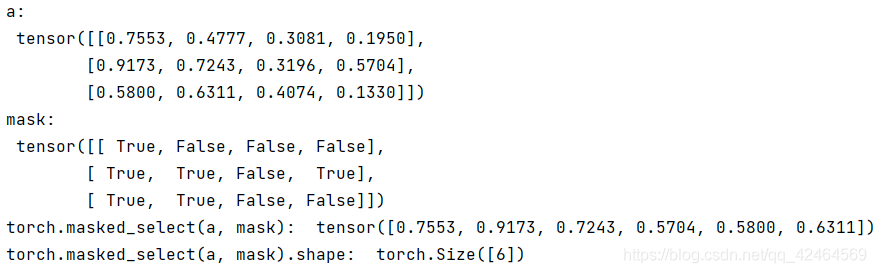
take选取
import torch
a = torch.rand(3, 4)print("a:\n", a)
# 会先打平再选取, [3, 4] -> [12]print("torch.take(a, torch.tensor([0, 2]):" , torch.take(a, torch.tensor([0, 2, 11])))![[外链图片转存失败,源站可能有防盗链机制,建议将图片保存下来直接上传(img-xGfjlI7y-1627480281343)(https://s3-us-west-2.amazonaws.com/secure.notion-static.com/87aea774-da63-4700-ade7-d450c0f1955f/Untitled.png)]](/images/csdn/741e9a2d8577d9bb161aa21a.png)
原文链接:CSDN
pytorch学习05:索引和切片
https://blog.homura.work/posts/csdn/119191035/